Last updated: October 14, 2026
Claude AI for marketing is most useful for jobs built on text and code. Use it for research with cited sources, briefs, copy drafts, subtitle text, website code through Claude Code, and reports built from analytics exports. It does not generate photos, illustrations or video footage, so visuals and sound need other tools. In my own work, I build websites with Claude Code and prepare video subtitles and edit steps with Claude. The other workflows below are ones any marketing team can run. The rule behind all of them: match each marketing job to one Claude feature and one human check.
In short:
- Map the job to a feature. Projects for brand knowledge, web search for research, file creation for reports, Claude Code for websites.
- Give it your facts, not your hopes. Claude writes well from accurate product information and fills gaps with guesses when information is missing.
- Keep a human check on every output. Prices, claims, names, numbers and code get reviewed before anything goes live.
- Know the limits. No image or video generation, usage caps on every plan, and data settings to read before you paste anything sensitive.
What is Claude AI, and which plan do you need for marketing?
Claude is a generative AI assistant made by Anthropic. It runs in the browser, the desktop app and the mobile apps, and Claude Code adds a tool for building software and websites. Anthropic's model documentation lists Claude Fable 5.1, Opus 5.5, Sonnet 5.5 and Haiku 5.5 as the current models. Model names change often; for day-to-day marketing work, the plan matters more.
I checked the plans on Anthropic's pricing page and help center on October 14, 2026. Prices are in USD and exclude applicable tax.
| Plan | Price | What matters for marketing |
|---|---|---|
| Free | $0 | Chat, web search, file creation, memory, connectors and Artifacts; up to five Projects; no Research, no Claude Code |
| Pro | $17/month billed annually ($200 up front), or $20 billed monthly | More usage, Projects, Research, Claude Code, Claude in Chrome |
| Max | From $100/month, billed monthly only | Five or twenty times the usage of Pro, higher output limits, priority access |
| Team | $20 per standard seat/month billed annually, or $25 billed monthly; for teams of 2 to 150 | Shared projects, central billing, SSO, no model training on your content by default |
Free is enough to test Claude on your own research and writing. Daily use across several brands needs a paid plan, and Claude Code requires one. A team that shares brand knowledge needs Team, because only Team and Enterprise can share projects.
Where does Claude fit in marketing? The Job → Feature → Check map
Many Claude guides start with prompts. I start from the job, because the job decides which feature fits and what a person checks afterward. I call this the Job → Feature → Check map.
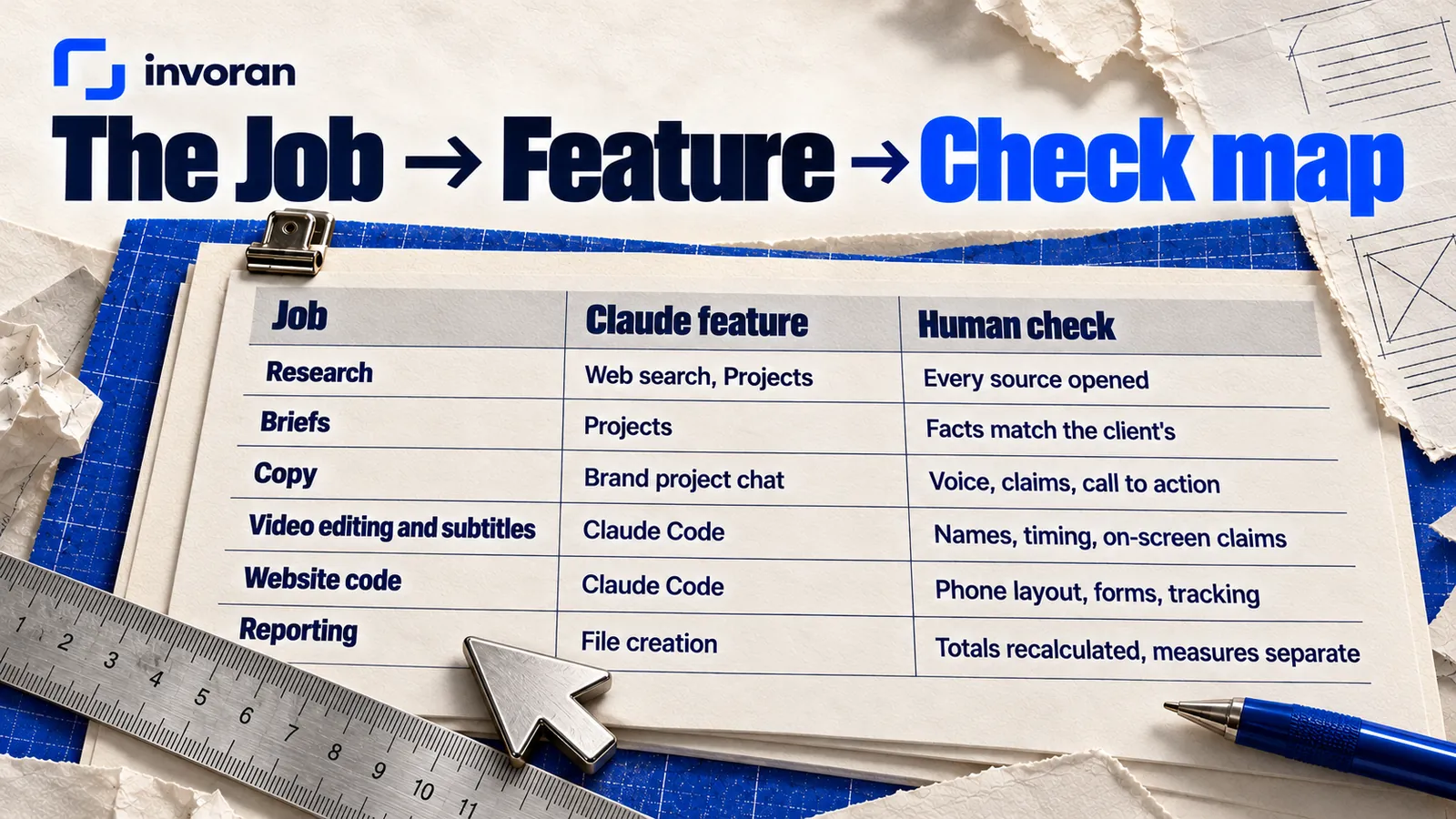
| Job | Claude feature to use | What to give it | What a person checks |
|---|---|---|---|
| Research | Web search with citations; Projects | The question, the market, the sources you trust | Every cited source opened; every number traced |
| Briefs | Projects (knowledge plus instructions) | Product facts, audience, voice, banned claims | Facts match what the client provided |
| Copy | Chat inside the brand's project | The brief, past posts that worked, the channel | Brand voice, claims, call to action, length |
| Video editing and subtitles | Claude Code for the cut, subtitles and assembly (with a command-line tool such as ffmpeg); chat for subtitle text | Script, voiceover text, brand terms, the clips | Spelling of names, timing, on-screen claims |
| Website code | Claude Code | Page goals, real content, design direction | Phone layout, forms, tracking, speed |
| Reporting | File creation (Excel, PDF) | CSV exports from GA4 and Search Console | Totals recalculated; measures kept separate |
How do you use Claude for marketing research and briefs?
Turn on web search for research. According to Anthropic's help center, answers that use search include citations to their sources; turning search on doesn't mean every reply runs a search. That makes the first pass fast: competitor positioning, how people phrase a problem, what a regulation says.
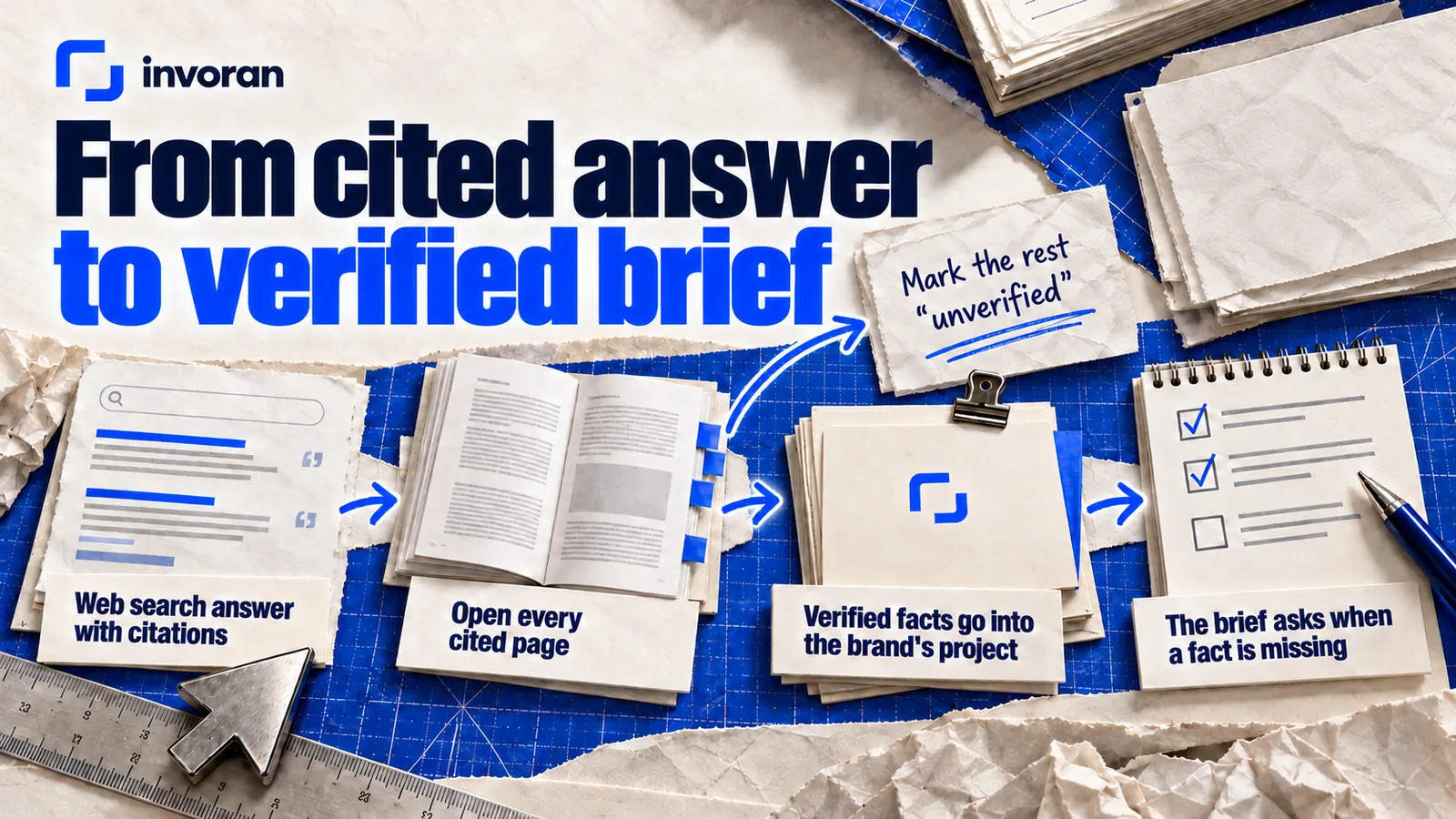
Never skip this step: open every cited page before a fact goes into a brief. Anthropic itself warns that Claude can display quotes that look authoritative but aren't grounded in fact, and a summary can lose context from the original page.
For briefs, use Projects: workspaces with their own knowledge base and instructions. Give each brand one project. Put in the product facts, voice notes, audience and the claims the brand never makes, so every chat starts with that context.
A research prompt to start from:
Find how [audience] in [market] describe [problem] in their own words. Use only sources from the last twelve months. List each finding with its source link and a one-line quote. Mark anything you could not verify as "unverified." Do not estimate numbers.
A brief prompt to use inside the project:
Using only the product facts in this project, write a one-page brief for a short video aimed at [audience]. Include the single message, three proof points taken from the facts, the claims we must not make and the call to action. If a fact you need is missing, ask me instead of filling the gap.
That last sentence matters most. Without it, Claude fills gaps with plausible features the product doesn't have.
Can Claude write marketing copy and emails in your brand's voice?
Yes, if you give it material to match. Claude follows detailed voice instructions well, and the draft depends far more on the brief and the examples than on the model.
The best input for social copy is real performance data from the account. Pratik10, an HR and payroll product, is one of the companies I work with. On its Instagram account, the four most-viewed posts reached 2.1K, 2.1K, 940 and 584 views, and all four open with a question (account data, October 2026). A pattern like that belongs in the brief, so drafts start from what this audience already responded to.
A copy prompt to adapt:
Write five opening lines for a short video about [topic] for [audience]. Each must be a question or a concrete contradiction, under twelve words, with no statistics and no promises of results. After each line, note which product fact from this project it relies on.
Emails follow the same rule: give Claude one action, the facts behind it and a past email that got replies.
Write a short email to [audience] that asks for one action: [action]. Use only the facts below. One link, one request, no offers we haven't approved. Suggest two subject lines.
Before a caption or an email moves on, check three things: every claim rests on a fact the brand supplied, the voice sounds like the brand, and the call to action is the agreed one. That check is what separates AI content marketing that builds trust from drafts that only fill a calendar.
For my own outreach emails, I prepare messages with ChatGPT instead. Which assistant you use matters less than keeping the check the same.
Can Claude help with video editing and subtitles?
Yes for the edit, no for the footage. Claude doesn't generate video footage.
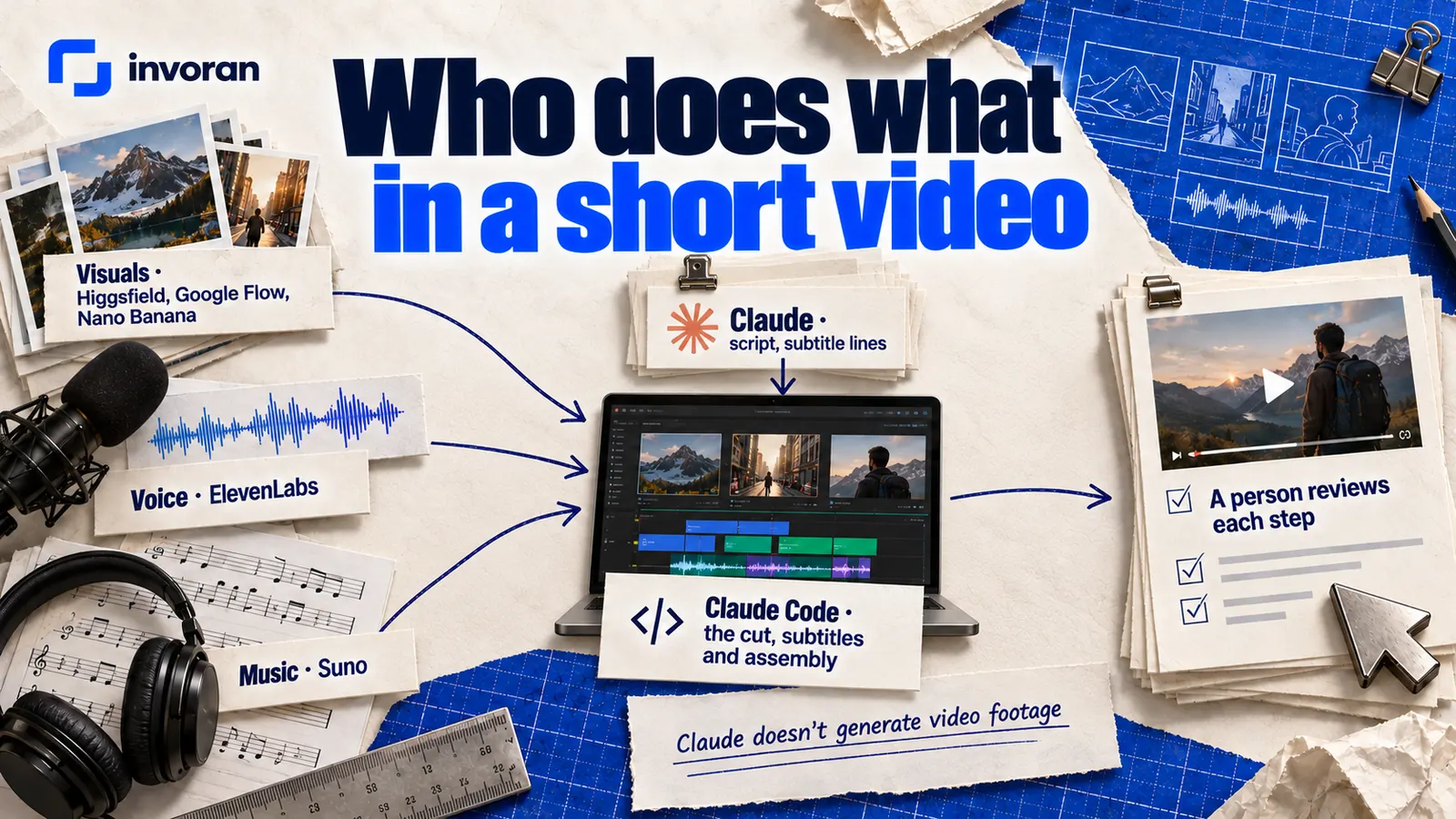
Claude Code edits files and runs commands, so it can cut, subtitle and assemble video files with a command-line tool such as ffmpeg. In chat, Claude writes the script, the subtitle lines and the on-screen wording.
In my production, visuals come from Higgsfield, Google Flow and Google's Nano Banana models, voice from ElevenLabs and music from Suno. I do the editing, subtitles and assembly with Claude, and a person reviews each step.
A subtitle prompt to adapt:
Split this voiceover script into subtitle lines of no more than [number] characters. Keep every word exactly as written, including brand and product names. Do not rephrase or shorten anything. Then list every claim that will appear on screen and the product fact it relies on.
Check timing against the voiceover in your editing tool; correct text can still land at the wrong moment. To judge whether this saves time, watch each step separately: time often disappears in waiting and corrections, not in generation, and a workflow only gets faster if corrections stay small.
What to check on every video before it's published:
- Names, brand terms and product names spelled exactly right in the subtitles.
- Subtitle timing against the voiceover, and line length on a phone screen.
- Every claim in the voiceover and on screen traced back to the product facts.
- The real product shown as it is, not an AI version that looks better than what the customer receives.
Can you build a marketing website with Claude Code?
Yes. The sites I deliver through my website design services are built with Claude Code, or with WordPress when that fits the project better. Claude Code is Anthropic's agentic coding tool: it reads a codebase, edits files and runs commands. It is included in the Pro, Max, Team and Enterprise plans and runs in the terminal, in IDEs such as VS Code and JetBrains, in the desktop app and in the browser.
It handles the repetitive parts of building well: page structure, responsive layouts, small tools such as calculators, and measurement setup. A prompt to adapt:
Build the [page name] page from the approved content file. Keep the copy exactly as written. Mobile first, one clear call to action above the fold. Add the analytics events from the tracking plan. Do not invent testimonials, numbers or features. When done, list every file you changed.
What a person should check before launch:
- The page at phone width on a real phone, not just the desktop preview.
- Every form submitted end to end, and the message actually arriving.
- Analytics and Search Console receiving data.
- Copy unchanged from what the client approved, with no placeholder text left.
Claude Code builds faster, but deciding what a page says and what the visitor does next stays with a person.
Can Claude handle marketing reports and analytics?
It can do most of the assembly. Claude creates Excel, PowerPoint, Word and PDF files and accepts CSV uploads for analysis, and file creation is available on every plan, including Free. My own monthly report for each brand is one page drawn from Google Analytics, Search Console and Ubersuggest.
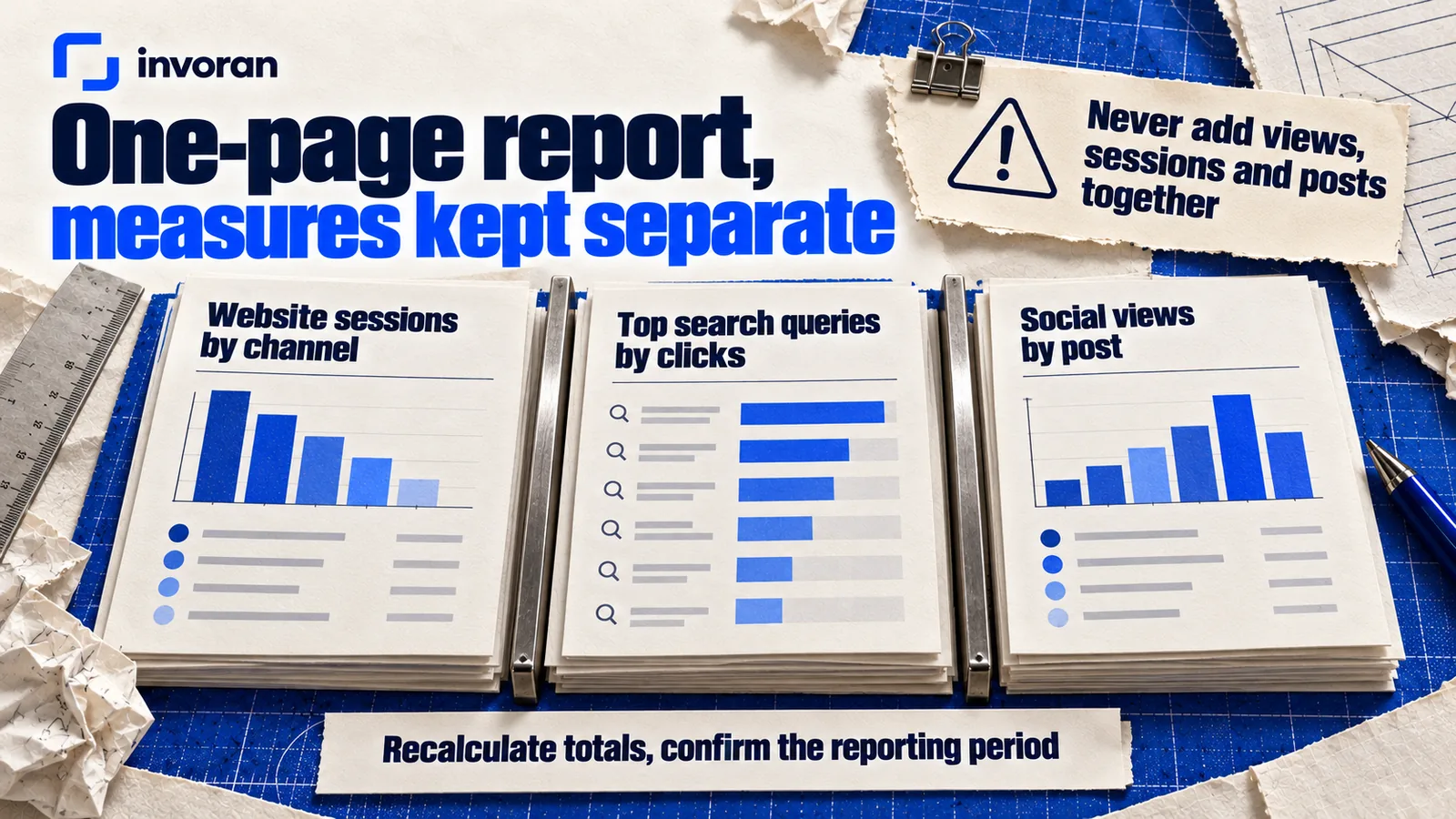
If you build yours with Claude, start with a prompt like this:
From these CSV files, build a one-page summary for [month]: website sessions by channel, top search queries by clicks, and social views by post. Keep each measure separate; never add views, sessions and posts together. Show the formula for every total. Flag any number that changed by more than half compared with last month.
The check is arithmetic and honesty: recalculate totals, confirm the reporting period and keep posts, views and visits separate. One caution from Anthropic's documentation: file creation uses more of your usage limit than regular chats.
Where does Claude fall short, and when should you use ChatGPT or Gemini?
Claude is strong at text, structure and code, but its limits are real.
- No images or video. Claude can make diagrams, charts and simple interactive graphics with code, but not photos or illustrations. Campaign visuals need a separate tool.
- Confident mistakes. Anthropic says Claude can produce responses that are incorrect or misleading and that look correct. Treat every price, statistic and legal statement as unverified until you check it.
- Current information. Without web search, Claude may be out of date on recent events. Turn search on for anything time-sensitive.
- Usage limits. Every plan has them, and Free counts web searches against its daily allowance.
- Data and permissions. On Free, Pro and Max, model-improvement settings govern routine training use, but Anthropic also describes safety-review, feedback and other opt-in cases. Anthropic's pricing page lists no model training on your content by default for Team. Connectors let Claude access and potentially modify data in the services you connect, so connect only what you trust, and keep customers' personal data out of consumer plans.
- Untrusted files. Anthropic warns that hidden instructions in external files or websites can try to trick Claude, so watch what it does with files you didn't create.
ChatGPT and Gemini both offer built-in image generation, according to OpenAI's and Google's help pages; Claude doesn't. For text jobs, skip the rankings and run a same-brief test: give two assistants the same brief and facts, judge each draft against your brand voice rather than against the other, and keep whichever needs fewer corrections. I describe this comparison in my guide on how to use AI in marketing.
How do you start using Claude for marketing this week?
Start with one row of the map, not every feature.
- Create one project for one brand with product facts, voice notes, audience and banned claims.
- Pick one repeated job, such as weekly captions or the monthly report.
- Save one prompt that says: facts only, ask when something is missing, mark what's unverified.
- Name the check and who does it.
- Compare after two weeks: time spent, edit rounds and errors caught.
I won't promise a time saving; step five tells you whether it works for your team. My AI training for employees follows the same idea: ChatGPT, Claude and Higgsfield on each team's own material, where judging and improving the output matters more than any single prompt.
Frequently asked questions
Is Claude AI good for marketing?
Claude is good for marketing jobs built on text, structure and code: research with cited sources, briefs, copywriting, subtitle text, websites through Claude Code and reports from analytics exports. It does not generate images or video. It works best with accurate product facts and a person checking every output.
Can Claude create images for marketing?
No. Claude does not generate photos or illustrations the way image-generation tools do, according to Anthropic's help center. It can create diagrams, charts and simple interactive graphics with code, and analyze images you upload. For ad creative or social visuals, pair it with a dedicated image or video tool.
Is Claude free to use for marketing?
Claude has a free plan that includes chat, web search, file creation, memory, connectors and up to five projects, as of October 14, 2026. It is enough to test Claude on your own marketing work. Daily use usually needs Pro, at $17 a month billed annually or $20 billed monthly, before tax.
Is Claude better than ChatGPT for marketing?
Neither is better at every marketing job. Claude is strong at long-form writing, document analysis and code through Claude Code, while ChatGPT and Gemini include built-in image generation. Give both the same brief, compare the drafts against your brand voice and keep whichever needs fewer corrections.
Does Claude use my marketing data for training?
On Free, Pro and Max, privacy settings govern routine model improvement, but Anthropic also describes safety-review, feedback and other opt-in cases. Incognito chats are excluded from model improvement. Team has no training on your content by default. Review the applicable policy before sharing customer data.
Can Claude Code build a marketing website?
Yes. Claude Code is Anthropic's agentic coding tool and is included in the Pro, Max, Team and Enterprise plans, as of October 14, 2026. It can build pages, layouts, forms and small tools, and set up analytics. A person still needs to test the site on a phone, submit every form and confirm tracking works.
Conclusion: one job, one feature, one check
Claude AI for marketing pays off when every job has a matching feature and a named human check: web search and Projects for research and briefs, chat for copy and subtitle text, Claude Code for websites, file creation for reports. It won't make your visuals, and it can be confidently wrong. Start with one job, compare it for two weeks, then add the next row.
If you want your team to learn this workflow on its own campaigns, send me a message on WhatsApp; the first 15 minutes are free.
Sources (links checked October 14, 2026)
- Claude — Plans and pricing
- Claude Help Center — What are projects?
- Claude Help Center — What are artifacts and how do I use them?
- Claude Help Center — Enabling and using web search
- Claude Help Center — Create and edit files with Claude (updated August 6, 2026)
- Claude Help Center — Connectors (pre-built integrations using remote MCP)
- Claude Help Center — Can Claude produce images?
- Claude Help Center — Claude is providing incorrect or misleading responses
- Claude Privacy Center — Is my data used for model training?
- Claude Code — product page
- Claude Platform Docs — Models overview
- OpenAI Help Center — Images in ChatGPT
- Gemini Apps Help — Generate & edit images with Gemini Apps
- Pratik10 Instagram account data, October 2026.